Catalog Verification#
This page discusses topics around setting up a pipeline to validate an existing catalog.
This is useful if you would like to verify that a catalog has been imported properly from the raw survey data, or to confirm the integrity of a catalog after it has been copied to another data site.
At a minimum, you need arguments that include where to find the input files, and where to put the output files. A minimal arguments block will look something like:
from hats_import.verification.arguments import VerificationArguments

args = VerificationArguments(
    input_catalog_path="./my_data/my_catalog",
    output_path="./output",
)
More details on each of these parameters is provided in sections below.
For the curious, see the API documentation for
hats_import.verification.arguments.VerificationArguments.
Input Catalog#
For this pipeline, you will need to have already transformed your catalog into
hats parquet format. Provide the path to the catalog data with the argument
input_catalog_path.
If you’re writing to cloud storage, or otherwise have some filesystem credential
dict, initialize input_catalog_path using universal_pathlib’s utilities.
Comparison to Golden Values#
In addition to making sure the metadata is self-consistent, you can provide expected values for metadata, and we will check the catalog against your truth:
truth_total_rows - if you know how many rows you expect your catalog to have,
e.g. based on the number of rows in your raw original catalog data, you can pass
this value along to be checked against the actual number of rows in the catalog.
truth_schema - path to a parquet file or parquet dataset that contains the
expected schema. This will check any non-HATS column metadata.
Progress Reporting#
By default, we will display some progress notes during pipeline execution. To
disable these (e.g. when you expect no output to standard out), you can set
verbose=False.
There are several stages to the pipeline execution, and you can expect progress reporting to look like the following:
Output#
You must specify where you want your verifier results to be written, using
output_path. The default output path will be output_path/verifier_results.csv,
but you can change the name of the output file with the output_filename argument.
If you’re writing to cloud storage, or otherwise have some filesystem credential
dict, initialize output_path using universal_pathlib’s utilities.
Understanding the output#
The verifier_results.csv contains additional information about each check, and
will mostly be useful in the event that your verification pipeline FAILS for any reason.
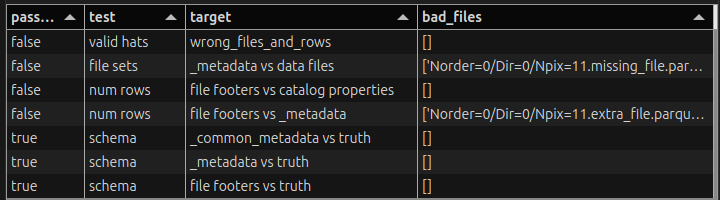
Example failure output of the verification pipeline#
There are six columns to the results:
datetime- when the check finished.passed- did the check pass? useful for filteringtest- the type of test run (e.g.num rows,schema)target- the files being tested, either a single file, or all file footers taken together as a datasetdescription- human-readable description of the testbad_files- a list of files that were inconsistent or missing. this is useful for locating issues with a small set of leaf parquet data files.
Additional Steps#
You can verify and inspect the metadata using methods described in the Manual catalog verification notebook.